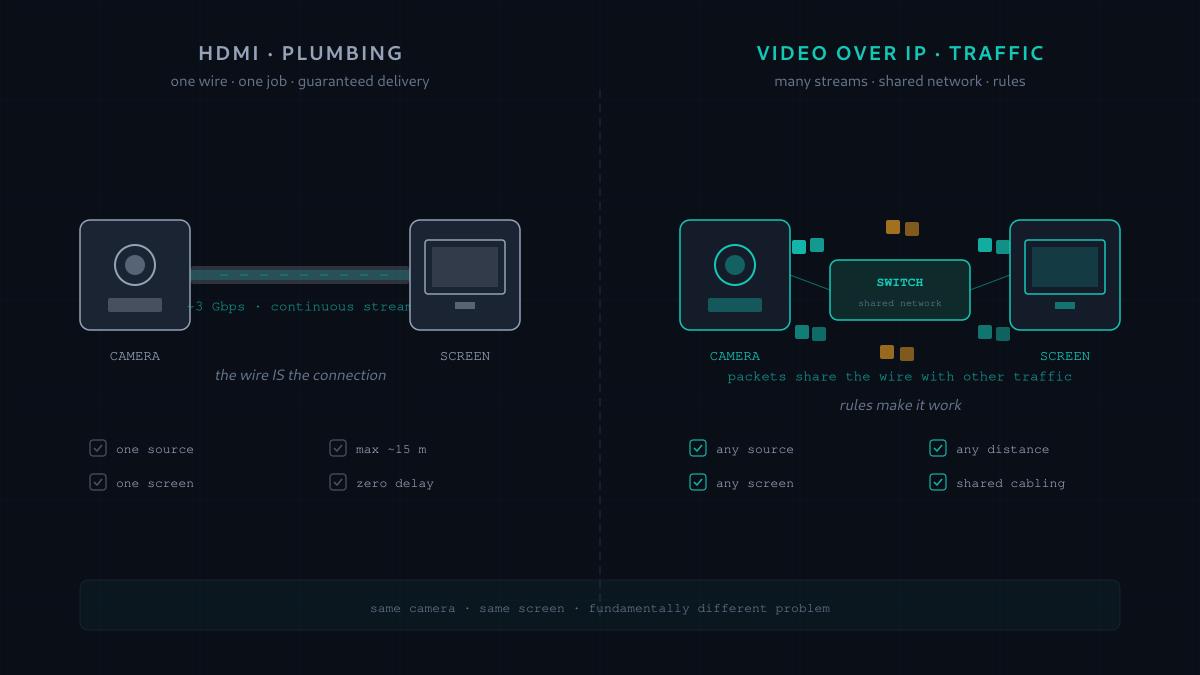
If you've ever plugged an HDMI cable into a TV, you've used a video signal. Nothing to think about — one end at the source, the other end at the screen, image shows up. The cable is the connection. Move the source to another room and you need a longer cable. Move it to another building and you need someone in a van with a very serious drill.
Video-over-IP is what happens when someone gets tired of that drill. Instead of a physical wire from every source to every screen, the video rides across the same kind of network that carries email and Zoom calls. The camera plugs into a network switch. So does the screen. Somewhere in between, packets. It sounds like a small change — a different cable, essentially — and it isn't. It's the difference between plumbing and traffic. Water moves through pipes because the pipes make it. Cars move through roads because everyone agrees to a set of rules. Those are different problems.
This post is about what actually happens in that second world. Not which product to buy, not how to configure a switch — just, what is a video signal made of, what has to happen for it to survive as network packets, and why anyone thought this trade was worth making.
What a video signal actually is
Start with what leaves the camera. A modern HD video signal is, roughly, a moving photograph — sixty photographs per second, each maybe two million pixels, each pixel a set of numbers describing color. The raw arithmetic is genuinely large: two million pixels, three color components each, sixty times a second, adds up to around three gigabits per second of raw data. That's the number a camera sensor produces before anything clever happens.
The cable version of this — HDMI, SDI, DisplayPort — handles that firehose by being purpose-built for it. An HDMI cable's job is to move exactly that much data, in exactly one direction, from exactly one source to exactly one screen, with essentially zero delay. It doesn't have to be clever. It just has to be fast and short.
extenders or fiber optic variants. The cable is doing all the work.A network wasn't built for that. A network was built to move small messages between many devices — a photo attachment, a chat message, a login. The whole design assumes you'll send a bit, wait a bit, share the wire with other traffic. Nothing about it is naturally suited to holding open a three-gigabit hose for an hour.
So the first thing anyone doing Video-over-IP has to solve is: how do we make video not look like a firehose to the network?
The trick: stop sending the whole picture
Here's the insight that makes the entire field possible. In a typical video, most of the picture doesn't change from frame to frame. Between frame 1 and frame 2 of someone talking on camera, the wall behind them is identical, the chair is identical, their shirt is identical — maybe only their mouth and eyes are different. Sending the whole picture sixty times per second is enormously wasteful.
Video compression takes advantage of this. Instead of sending sixty complete pictures per second, it sends occasional whole pictures — call these keyframes — and in between, it sends only the differences. "The wall is the same. The chair is the same. This block of pixels here moved slightly to the left. This other block changed color." A compressed video stream is mostly a series of instructions for updating a picture the receiver is already holding.
Done well, this compresses three gigabits per second down to something between three hundred megabits (very high quality, "visually lossless") and three megabits (Netflix over the internet). A 300× compression ratio is not unusual. Suddenly the network doesn't have to carry a firehose. It has to carry a manageable stream — comparable to a decent Netflix session.
How the picture becomes packets
Once the video is compressed, it still isn't ready for a network. A network doesn't move continuous streams — it moves discrete little envelopes called packets, each typically around 1,500 bytes. So the compressed video gets sliced up. Chop the stream into packet-sized pieces, put a number on each one so the receiver knows the order, address them to the screen, and send them out the network port.
The screen — well, technically a small computer inside the screen, called a decoder — collects the packets as they arrive, puts them back in order, reassembles the compressed video, then decompresses it back into pictures and displays them.
That whole process — camera captures, encoder compresses, packetizer slices, network delivers, packets get reordered, decoder decompresses, screen displays — is Video-over-IP. Every product and protocol in the field is a specific answer to how exactly to do those steps, how much delay is acceptable at each one, and what quality survives at the other end.

What network people care about: bandwidth, latency, and loss
A network engineer looking at Video-over-IP for the first time cares about three numbers, and they're not the ones a video engineer cares about.
- Bandwidth. How much data per second does this stream need? A single 1080p compressed stream might be 20 Mbps. Twelve cameras is 240 Mbps. Add uncompressed 4K at 12 Gbps for a broadcast job and suddenly you need 10-gigabit switches.
- Latency. How long between the camera capturing something and the screen showing it? On a Zoom call, half a second of lag is fine. For a live event where a musician sees themselves on a monitor, sixteen milliseconds is the outer limit before it becomes uncomfortable. For a surgeon operating remotely, single-digit milliseconds. Different jobs, wildly different requirements.
- Packet loss. Networks occasionally drop packets. On a web page you don't notice — the browser asks for the missing bit again. On a live video stream, a packet dropped is a picture dropped. Some systems tolerate a little loss and mask it; some can't tolerate any and rely on the network never losing packets in the first place.
Every Video-over-IP technology is a specific set of tradeoffs across those three. High quality, low latency, and packet-loss tolerance are the "pick two" of this world — you can't have all three, and different systems pick different pairs.
The tradeoffs, made concrete
Here's where the technology names you'll hear start to make sense. You don't need to memorize these — the point is to see how each one is answering the tradeoff question differently.
They aren't competing to be the best. They're competing to be the right one for a specific job. A church that needs cameras on stage feeding screens in the lobby wants NDI or Dante AV — quality is fine, cost matters, gigabit switches are fine. A live TV network's studio wants ST 2110 — quality must be perfect, latency must be tiny, and they can afford the network to make that happen.
Why bother, then?
If HDMI just works and Video-over-IP is this complicated, the reasonable question is why anyone would do this at all. The answers are actually simple.
- Distance. Once video is on the network, it can go wherever the network goes. Cross a building. Cross a campus. Cross a continent, if the connection is good enough. HDMI stops at fifteen meters.
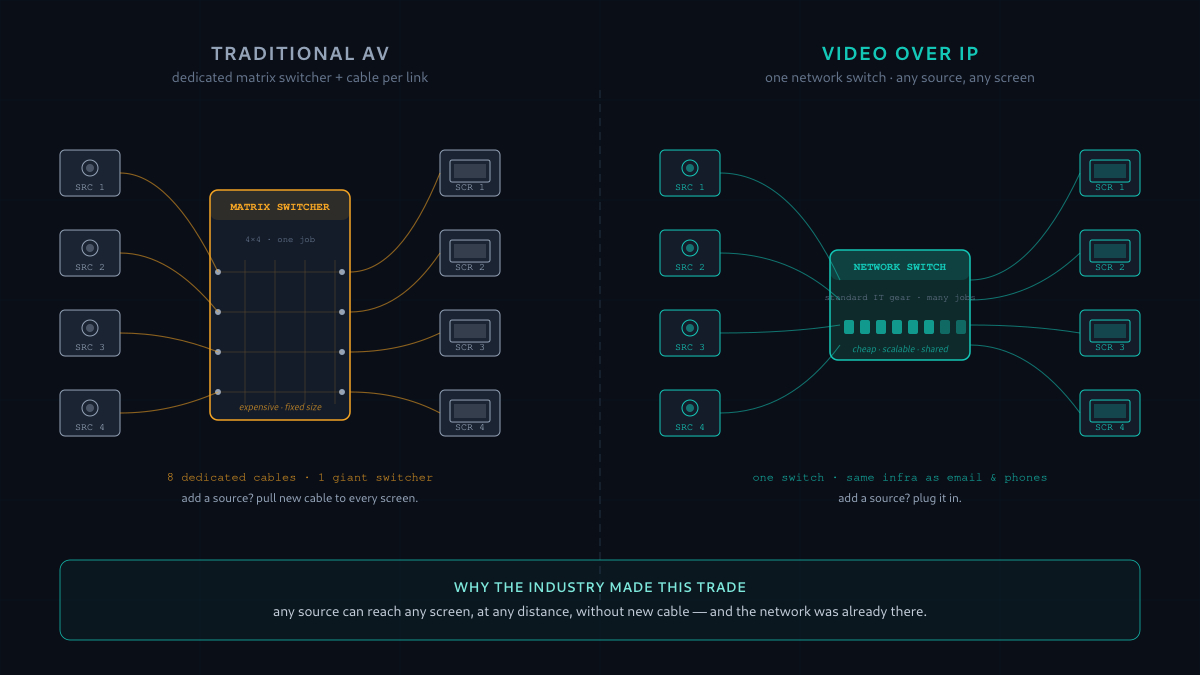
- Many-to-many. With HDMI, if you want to route eight sources to eight screens, you need an eight-input, eight-output matrix switcher — a specialized, expensive box. On a network, any source can reach any screen just by joining the right multicast stream. The switching is virtual and free.
- One infrastructure. A modern building already has network cabling to every room for computers and phones. Video-over-IP rides on the same cabling. That's often cheaper than pulling dedicated AV cable, and it means the same IT team that manages the network manages the video.
- Scale. Adding a source or a screen means plugging a new box into the switch. It doesn't mean re-cabling anything. Adding a source with HDMI means running new cable to every screen that needs to see it.
These are the reasons AV has been steadily moving to Video-over-IP for the last decade, and why AV job listings increasingly ask for networking knowledge as much as AV knowledge.
The gotchas nobody warns you about
The story so far makes Video-over-IP sound almost easy. It isn't. There are three things that bite everyone new to this world, and knowing about them ahead of time is most of the battle.
- Video traffic is enormous compared to what the network was designed for. A network that comfortably carries every laptop and phone in a building can be overwhelmed by a single uncompressed 4K stream. You do not just "add video to the existing network." You either engineer a network for the load, or you use compressed technologies (NDI, Dante AV) that fit within normal network capacity.
- Video is unforgiving of network problems. A slow web page loads a second later and nobody notices. A video stream missing packets for half a second is a visible glitch that everyone in the room sees. Video networks need to work almost perfectly, all the time — which is why so much AV networking is really network engineering: getting the switches, the routing, the multicast, the timing all correct so the video has nothing to complain about.
- The AV world and the IT world speak different languages. An AV engineer will ask about signal chain and gain structure. An IT engineer will ask about VLANs and QoS. Video-over-IP is the seam between them, and most real projects fail not because the technology is bad but because the two teams didn't understand what the other one needed. If you're getting into this, being able to translate between both is the most valuable skill you'll build.
The short version
Traditional AV is plumbing. A video signal goes down a wire from a source to a screen, and the wire is dedicated to that job. Video-over-IP is traffic. The video is compressed, sliced into packets, and shares a network with everything else — trading the guaranteed simplicity of a dedicated cable for the flexibility of a shared road system.
The compression is what makes it possible on ordinary networks. The tradeoffs among quality, latency, and packet tolerance are what created a whole family of protocols with names like NDI, Dante AV, SDVoE, and ST 2110 — each optimized for a different job. And the reason the industry made this trade in the first place is scale: one network can do what a room full of matrix switchers and cable trunks used to do, and any source can reach any screen without pulling new cable.
If you want to know how a specific one of those protocols works — how NDI is different from Dante AV, or when SDVoE actually beats them both — that's a comparison post I'll write next. And if you're the person who actually has to make one of these networks not drop packets, the post you want after this one is Why IGMP Snooping Makes or Breaks Your AV-over-IP Network — because the answer to that question is where the rubber meets the road.